AI Agents vs Automation: Which Should Your Business Use?
Compare AI agents and traditional automation by predictability, cost, risk, and use case. Learn when to use rules, agents, or both in one workflow.
By the VANGAI team · · 14 min read
Key takeaways
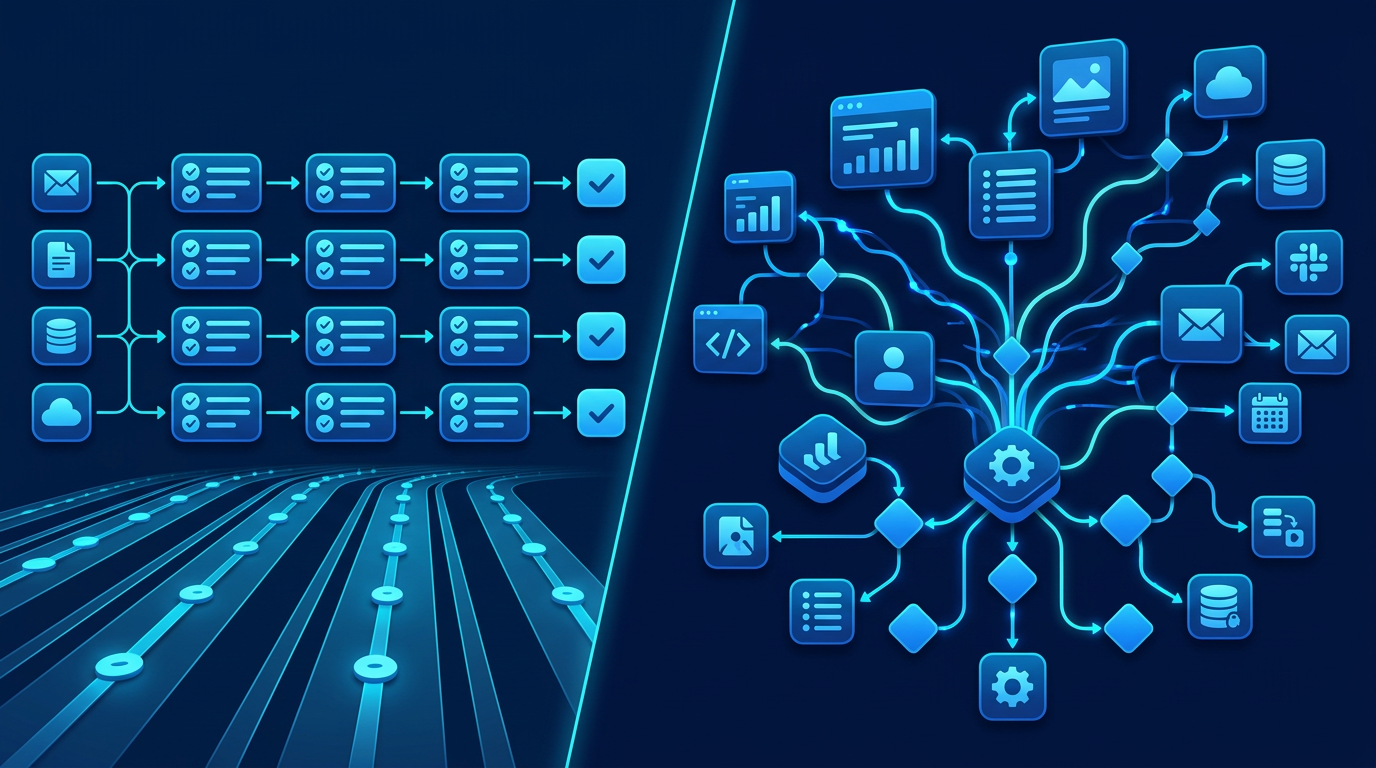
- Traditional automation follows predefined steps; an AI agent uses a model to choose among actions toward a goal, within permissions and guardrails.
- Use rules for stable, high volume and auditable tasks. Consider agents for variable inputs and decisions that resist a simple decision tree.
- The strongest systems often combine the two: deterministic workflows handle validation and final writes, while AI handles interpretation.
- Measure total cost, error rate and human review time on real examples before allowing either approach to act on customers or money.
What is the difference between AI agents and automation?
Traditional automation executes steps you define in advance. An AI agent uses an AI model to interpret a goal, select actions and sometimes use tools to complete a task. If the input and the next action are predictable, ordinary automation is usually simpler. If the work needs interpretation across changing situations, an agent may help, but it needs stronger testing and oversight.
Think of a new lead arriving in a web form. A rule can add the lead to your CRM, assign a salesperson by territory and send a confirmation. An agent could read a free-form inquiry, identify what the buyer actually needs and draft a contextual response. A practical system might do both: rules validate the lead and update the CRM; AI classifies the inquiry and suggests a reply; a person approves anything unusual.
The labels are not perfectly standardized. Vendors sometimes call a single prompt an agent, while others reserve the term for software that plans and invokes tools. Ask what a system can actually do, what permissions it has and who reviews its actions rather than buying based on a name. IBM's explanation of AI agents describes agents in terms of goals, planning and tools; IBM's guide to intelligent automation describes how AI and workflow automation can work together.
How rule-based automation works
A traditional workflow connects triggers, conditions and actions. A new email arrives, a condition checks its sender or subject and a tool creates a task. The operator defines the branches beforehand. If the same input arrives again under the same conditions, the workflow should make the same choice.
This does not mean automation is primitive. A rules engine can manage thousands of conditions, integrate several services and move information rapidly. Its strength is predictability: you can trace why a step happened. It is often the best answer for transferring records, sending reminders, routing by known fields and enforcing approvals.
A basic example is appointment confirmation. When a booking is completed, send a confirmation, add a calendar event and schedule a reminder. You do not need an agent to decide whether to do those things. A good workflow is cheaper to maintain and easier to audit.
Rules do become unwieldy when each new exception needs another branch. If a customer describes their issue in a paragraph, exact keyword matching may send them to the wrong queue. That is where a bounded AI step can help without replacing the workflow around it. For more on the broader design, see our AI workflow automation guide.
How an AI agent works
An agent receives a goal, context and a set of permitted tools. It can interpret a request, select a next action, inspect the result and sometimes continue until it reaches a stopping condition. For example, a support agent might search approved help documentation, check an order status tool and draft an answer. It should not be allowed to issue refunds simply because it can answer order questions.
The useful distinction is discretion. A rule follows a path written by a person. An agent may select a path at runtime. That makes agents flexible when the input is messy, but it also means they may misunderstand intent, choose the wrong tool or make up a fact. The more autonomy you give an agent, the more explicit its permissions, logs, test cases and escalation rules should be.
Not every AI feature is an agent. Summarizing an email with one model call is an AI step. A system that decides whether to search a knowledge base, request missing details or escalate a case, then takes the allowed action, is closer to an agent. The AI agents for business guide covers the implementation pattern in more depth.
AI agents vs automation at a glance
- Inputs: rules favor structured fields; agents can interpret free text, documents and changing context.
- Decisions: rules follow explicit branches; agents choose among permitted actions based on model output.
- Repeatability: rules are generally deterministic; agent responses can vary and must be evaluated statistically.
- Setup: simple rules can be quick to build; agents need context design, tool permissions, evaluation and monitoring.
- Operating cost: a rules workflow uses software and integration capacity; agents also incur model usage and review costs.
- Auditability: rules are easier to trace; agents need recorded inputs, outputs, tool calls and decisions.
- Failure mode: rules may break on an unseen exception; agents may misinterpret or confidently produce an unsupported answer.
- Best fit: rules handle stable operational processes; agents handle bounded tasks that require judgment about variable information.
These are tendencies, not universal price or performance guarantees. The complexity of the specific workflow matters far more than the marketing category attached to it.
When traditional automation is the better choice
The instructions can be written as a short decision tree
If the team can state the decision clearly, implement it as a rule. For example: if an invoice is approved and its amount is under an authorized limit, queue it for payment; otherwise request manager review. No language model should invent an exception to that financial control.
You need the same action every time
Regulatory notifications, deadlines and data synchronization benefit from predictable execution. If a system must enforce a policy identically across cases, use explicit rules for the policy. AI can help read the inputs, but the final check belongs in deterministic code or a human approval.
The task is mostly moving data
Copying a form field into a CRM, generating an appointment reminder and recording an event are integration problems. Adding an agent often increases cost without making the experience better.
The consequences of an incorrect action are high
Anything involving payments, sensitive personal data, account access or contractual commitments should default to restricted actions. You can still use AI to propose the next step, while people or validated rules authorize the outcome. The NIST AI Risk Management Framework offers a useful way to think about measuring and managing these risks.
When an AI agent is worth evaluating
The input does not arrive in neat fields
Customers describe their issues in their own words. Contracts contain inconsistent clauses. Sales inquiries mix requirements, objections and deadlines. An agent can extract meaning and suggest a next action when writing rules for every phrasing would be impractical.
The task requires several conditional steps
An agent can be useful when the number of paths is large but the permitted actions are limited. Consider a support assistant that may search documentation, ask a clarifying question or prepare a human handoff. It can choose among these steps without being allowed to alter a customer's account.
The output needs synthesis, not just transfer
Drafting a contextual response from approved sources, summarizing conflicting notes or comparing options can benefit from AI. A human should review outputs where a mistake could harm the customer or business. See our guide to AI document processing for document-heavy examples.
You can test and observe the system
Agents need a representative set of real tasks, expected outcomes and clear failure categories. If nobody can define what a good answer looks like, the organization is not ready to hand the task to an agent. Start with read-only assistance and collect examples before enabling actions.
Three scenarios that show the difference
Lead response
A form submission arrives. Automation checks that required fields exist, stores the record and routes it by territory. An AI agent reads the free-text project description and suggests which service fits. Automation sends a standard confirmation; the salesperson reviews the agent's suggested personalized follow-up. This hybrid approach improves context without letting an unreviewed model promise pricing or timelines. Our AI lead generation guide explains the sales side.
Customer support
Rules tag a message with the channel and customer account. An agent searches approved articles and suggests an answer to a common question. If the customer disputes a charge, rules block the agent from changing financial records and route the case to a person. The agent can prepare a concise summary for the human representative. Learn more in AI chatbots for customer service.
Invoice intake
A document extraction tool reads invoice fields. Rules reject missing invoice numbers or duplicate IDs and route high-value payments for approval. A bounded agent might describe why a vendor's invoice does not match a purchase order, but the payment decision remains with deterministic checks and authorized staff. This keeps interpretation useful without turning the model into a financial authority.
Why hybrid designs often win
Many real processes contain two kinds of work: interpretation and execution. AI is useful for interpreting an email or document. Rules are useful for enforcing required fields, recording changes and applying business policy. Keeping those jobs separate makes the system easier to test.
A hybrid process can follow a simple pattern:
- Receive and validate: check permissions, input format and required fields.
- Interpret: let AI classify, summarize or draft using approved information.
- Check confidence and constraints: verify claims or ask for missing information; do not trust a model's self-reported certainty alone.
- Approve: route sensitive or ambiguous cases to a person.
- Act and record: use deterministic integrations for final writes and keep an audit trail.
- Review: measure errors, reversals, response time and staff effort.
This is not a compromise that weakens the AI system. It is usually the architecture that makes the system safe enough to use every day.
Costs to compare beyond the initial build
The cost of rules includes workflow subscriptions, integration usage, developer time and maintenance when business processes change. The cost of an agent includes all of that plus model calls, context retrieval, evaluations, monitoring and human review. An agent that appears cheap per message may be expensive if a person must correct half its work.
Estimate costs with a small pilot. Count monthly volume, average runtime and what percentage of cases require review. Include the cost of the mistakes the system might make. Compare those totals with the time it saves and the speed it adds for customers. Our AI ROI guide offers a framework for measuring the before and after.
Avoid claiming a universal break-even point. A simple workflow handling thousands of records may favor rules overwhelmingly. A low-volume task that consumes hours of expert reading may justify an agent even with careful review. The baseline is the deciding factor.
A practical decision checklist
Before you choose, answer these questions with the staff who actually perform the work:
- Can we write the correct next step as a stable rule?
- Are inputs structured, or do people have to interpret messy language and files?
- Does a wrong action create financial, legal, privacy or trust risk?
- Do we have approved data that the system can rely on?
- Can we limit tool access to only the necessary read or write operations?
- Who checks uncertain outcomes, and how quickly can they intervene?
- What does a successful case look like, and how will we count failures?
- Could a simple rule plus one AI classification step solve the problem?
If the last answer is yes, start there. You can always add more autonomy after the first implementation proves accurate and valuable.
How to run a low-risk pilot
Choose one workflow with a clear owner. Collect a representative sample, including normal requests, edge cases and known failures. Write down the current time per case, error rate and customer wait time. Build the simplest version that could improve the process, then test it against the sample before connecting live actions.
During the pilot, let AI suggest actions rather than carry them out. Review every exception. Separate model errors from integration failures and bad source data. Once the system consistently handles low-risk cases, gradually permit narrow actions with limits and rollback procedures. Do not use a successful demo as proof of production reliability.
Microsoft's responsible AI resources and NIST's AI risk framework both emphasize governance and ongoing evaluation. The precise controls depend on your use case, but the principle is consistent: monitor behavior after deployment, not just before it.
Common mistakes when choosing between them
- Calling every workflow an agent: a label cannot fix a poor process. Define the actual decision and required actions first.
- Making AI decide policy: write critical business rules explicitly, and reject outputs that break them.
- Using rigid rules for language interpretation: a large keyword list may be less reliable than a tested classifier with a fallback to a person.
- Giving an agent broad access at launch: start read-only or draft-only, then grant the narrowest required permissions.
- Measuring only speed: include accuracy, correction time, customer satisfaction and avoided risk.
- Skipping ownership: name the person responsible for reviewing logs and updating the system when policies change.
What to document before you let an agent take action
An agent's permissions are a business decision, not merely a software setting. For each proposed action, document who can request it, the system it touches, the maximum impact of an error and whether a person can undo it. Reading approved FAQs is different from editing a customer account. Writing a draft is different from sending it. Checking inventory is different from promising a delivery date.
A useful permission ladder starts with read-only access, moves to draft-only suggestions, then allows human-approved writes and finally grants tightly bounded automatic actions for cases that have passed evaluation. The ladder can differ within one workflow. A bot might answer a verified shipping policy automatically but require approval before applying a credit. Do not treat all tool access as one on/off switch.
Logs should record what the agent was asked, which source it used, which tool it invoked, what result came back and whether a human intervened. Design logging to protect personal information. If a staff member cannot reconstruct why a customer received an answer, the system needs better observability before more autonomy.
How to test both approaches fairly
Select a sample that reflects real volume and edge cases. For an email routing workflow, include short emails, long emails, unusual phrasings, forwarded messages, duplicate inquiries and incomplete information. Define the correct outcome before comparing systems, and note cases where more information is genuinely required.
Run the same sample through a rules workflow and a bounded AI-assisted version. Record correct routes, false routes, unanswered cases, average staff review time and time to resolution. For an agent, test repeated runs on difficult examples because the same prompt can produce different responses. For a rules workflow, test changes to source fields and integrations because a perfectly written condition still fails if the upstream data is wrong.
Then conduct a limited live pilot. A system that wins a static test may still struggle with new inquiries, staff behavior or integration latency. Look at both customer outcome and operating burden. If the AI version saves a minute in classification but requires two minutes of review, it has not improved the workflow. If rules handle nearly every case and AI only adds value to a narrow exception queue, keep the rules and apply AI to that queue.
What to ask a vendor or implementation partner
Ask for a diagram of every data source and action, not only a video of the assistant answering questions. Request a sample audit record and a demonstration of a deliberately difficult case. Ask what happens when an integration times out, when a source document is outdated and when two instructions conflict. A credible team will show how the system refuses, escalates or retries safely, rather than promising perfect answers.
Confirm who updates instructions when the business changes a policy, who can disable the agent and how quickly an incorrect action can be corrected. Ask whether you can export your workflow and logs if you change vendors. These questions matter just as much as the quality of the model, because day-to-day ownership determines whether the system stays useful after the initial launch.
The bottom line
AI agents and automation solve different parts of the same operational problem. Rules are excellent at reliable execution. Agents can help with interpretation and variable decisions. Most growing businesses should automate what is predictable, use AI where judgment adds value and keep people involved where a mistake matters.
If you are unsure which part of your process belongs in each layer, book a discovery call. VANGAI can help map the workflow and choose the simplest approach that produces measurable results.
Frequently asked questions
Are AI agents the same as automation?
No. Automation follows defined triggers and rules, while an AI agent can interpret context and choose among permitted actions toward a goal. A business system can combine both.
When should a business use an AI agent instead of rules?
Consider an agent when inputs are variable, the task needs interpretation, and you can test it on real cases with limits on its actions. Use rules for stable, auditable decisions.
Can AI agents make mistakes?
Yes. Agents can misunderstand requests, use the wrong tool or present unsupported information. Test them, limit permissions and require human review for high-risk actions.
Is automation cheaper than an AI agent?
For a simple repeatable workflow, usually. The full cost depends on integration, volume, model usage, review and maintenance, so compare a pilot against your current baseline.
Sources and further reading
Ready to put this into action?
Book a free discovery call and we will map the highest impact AI opportunities for your business.
Book a Call →